 MixSift
The queue captures choices when you add a file
Home’s initial result is a choice about the queued job’s first output. Choose it, the ordinary output format and the output folder before Add File(s) or drag-and-drop. When the file joins the Queue, the job captures those defaults. Changing Home defaults afterwards does not rewrite an existing queued job.
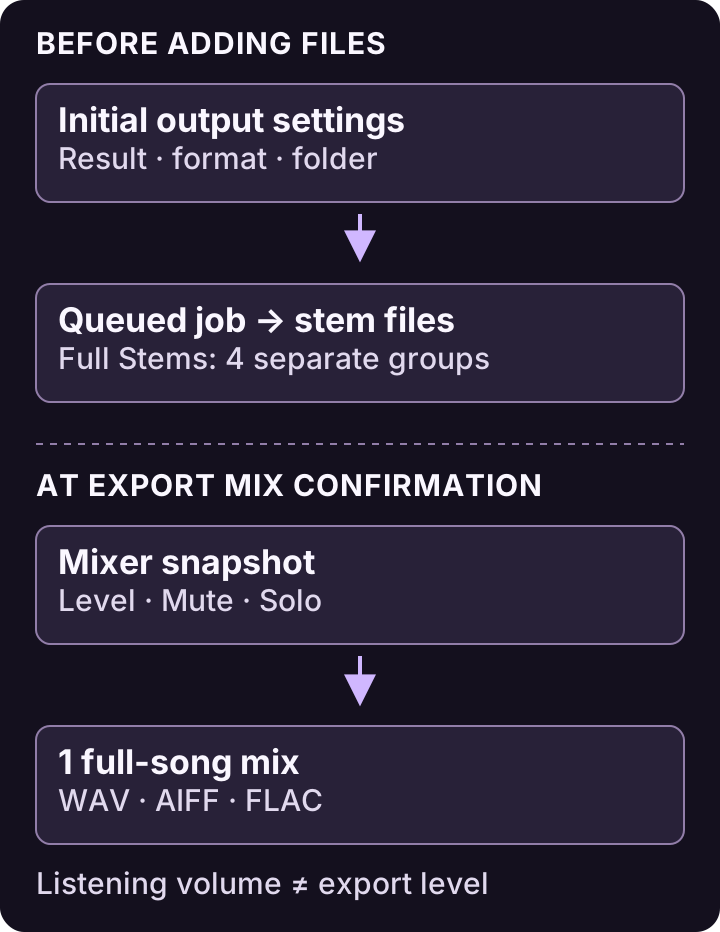
Conceptual Full Stems example. Export Mix saves WAV, AIFF or FLAC; Master Volume and metronome are excluded.View full-size diagram ↗
This matters when adding several recordings: make the intended choices first rather than expecting a last-minute Home change to revise everything already queued.
Match the first result to your task
Full Stems: keep Vocals, Drums, Bass and Other as separate outputs for independent work.
Vocals + Instrumental: request the fixed vocal and accompaniment outputs.
Karaoke / Instrumental: request the fixed instrumental output. This is an audio result, not synchronized lyrics.
Acapella: request the vocal output.
These fixed output choices are separate from Practice Mix presets in Stem Mixer. Choosing Karaoke on Home is not a saved custom Level/Mute/Solo balance, and choosing Play Bass — No Bass later does not rewrite the job’s original output choice.
Use a deliberate import sequence
Check the initial result on Home. Choose Full Stems when you need all four independent groups.
Choose the ordinary output format and use Choose Output Folder while the intended destination is available. Ordinary stem outputs support FLAC, MP3, AAC (M4A), WAV and AIFF.
Add the permitted local file using Add File(s) or drop it onto Home. Confirm the queued job reflects the intended choice before Split Tracks.
If you discover an already queued job has different settings, inspect that job’s available controls rather than assuming changing Home has fixed it. Preserve your source files and completed results.
For supported inputs, Mac requirements and codec/protection limits, see the input checklist.
A later Export Mix is a separate confirmation
After opening a completed compatible project in Stem Mixer, Export Mix saves one full-song WAV, AIFF or FLAC from the confirmed Level, Mute and Solo snapshot. Its destination and format belong to that mix-export workflow. Home’s ordinary MP3 or AAC choice does not enable those formats in Export Mix.
Master Volume and metronome remain listening-only. Mixer changes after confirmation do not revise the file already exported. Use the output guide when deciding between the job’s individual files and a later custom practice mix.